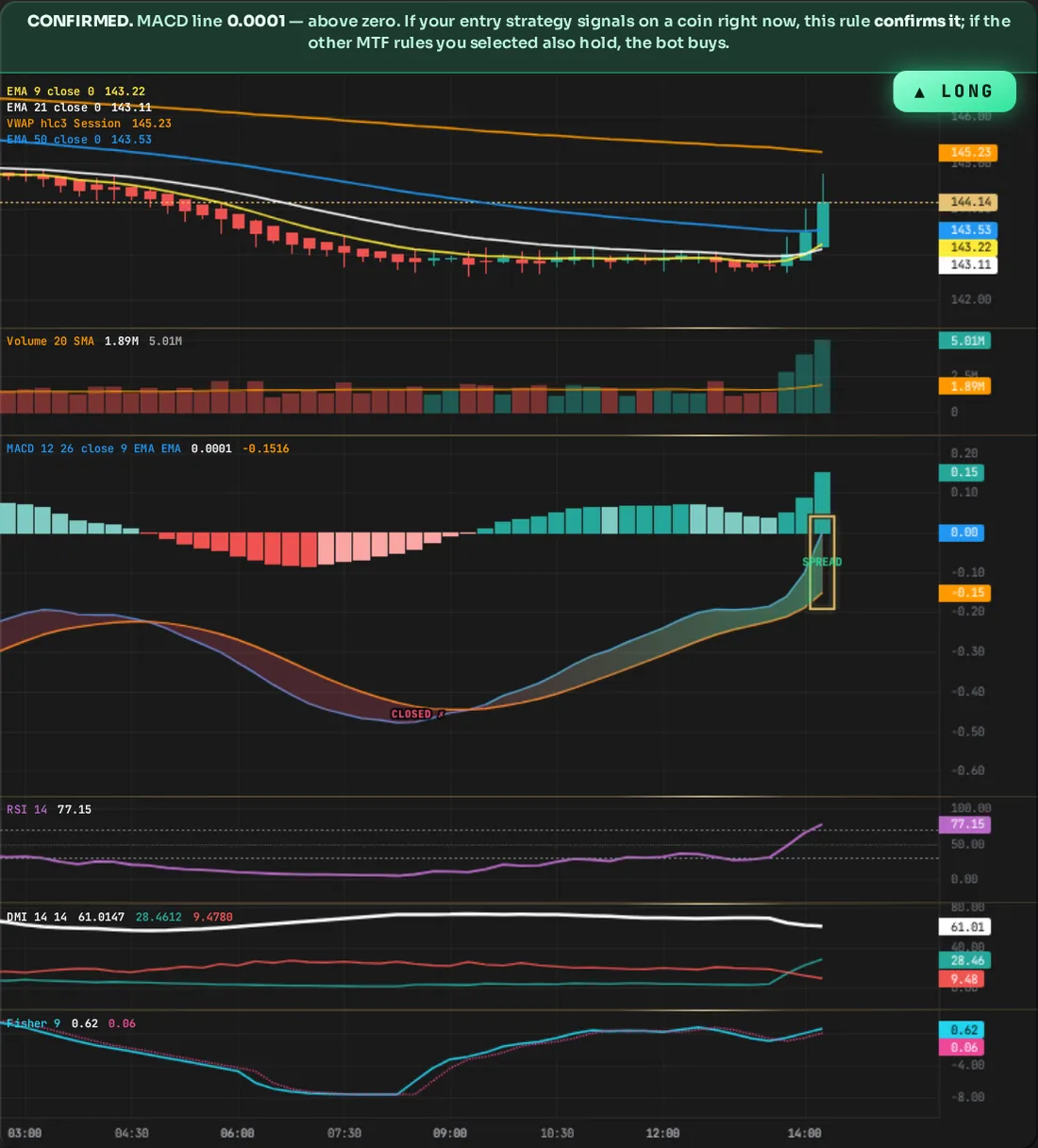
MTF confirmation · MACD
Higher-timeframe confirmation conditions for MACD: when your entry strategy gives a signal, the bot checks that this condition also holds on the higher timeframe you chose.
Conditions
MTF · Above Zero
What exactly does this condition ask?
On the last candle of your chosen timeframe, the MACD line (blue) must be above zero — the fast average above the slow one, momentum up. The Signal line isn't checked; that's how it differs from the same-named rule in the entry strategy.
Which settings does it read?
There's no cell that opens for this row in the table; checking it is enough. The rule looks at that timeframe's last candle, it doesn't read a box.
How do you use it?
At entry you picked DI+ crossed 50 upward · RSI above 60 · MACD above zero on 5m; on MTF you picked Above Zero — 4h · EMA trend up (2h) · DMI above (12h). 10 coins passed the entry on 5m; 4 were filtered out on 2h, 5 were filtered out on this rule on 4h, and 1 coin passed all of them — the bot sent a buy order only for that one. There's no limit, you build the combination: more selections give a rare but consistent alert, fewer selections give a frequent but low-accuracy one — a coin rising on 5m but falling on 4h usually has a small and temporary rise.
What is MTF confirmation?
When your entry strategy gives a signal on a coin, the bot doesn't buy right away; it first checks the rules you selected here. It checks each rule on its own timeframe: you can select multiple timeframes and multiple indicators, and all of them must hold at the same time. If only 2 of the 10 coins that passed the entry strategy also pass all the MTF rules, the bot only buys those 2 coins. MTF never opens a trade on its own; it only filters.
Does this condition close the position?
It only has a say at entry; even if the higher timeframe reverses after the position opens, it doesn't close it. What closes it is your choice: if Profit Lock is on, PNL tracking takes over (while it's on, the Trailing Stop, Take Profit Net, Limit Take Profit Net boxes are locked); if it's off, the numbers you entered in these three are placed as orders on Binance and the position closes from there. DCA Rescuer and Liquidation Shield kick in under their own conditions; and you can always close from the panel with CLOSE or manually from Binance.
MTF · Below Zero
What exactly does this condition ask?
On the last candle of your chosen timeframe, the MACD line (blue) must be below zero — the fast average below the slow one, momentum down. The Signal line isn't checked; that's how it differs from the same-named rule in the entry strategy.
Which settings does it read?
There's no cell that opens for this row in the table; checking it is enough. The rule looks at that timeframe's last candle, it doesn't read a box.
How do you use it?
At entry you picked DI− crossed 50 upward · RSI below 40 · MACD below zero on 5m; on MTF you picked Below Zero — 4h · EMA trend down (2h) · DI− above (12h). 10 coins passed the entry on 5m; 4 were filtered out on 2h, 5 were filtered out on this rule on 4h, and 1 coin passed all of them — the bot sent a sell (SHORT) order only for that one. There's no limit, you build the combination: more selections give a rare but consistent alert, fewer selections give a frequent but low-accuracy one — a coin falling on 5m but rising on 4h usually has a small and temporary fall.
What is MTF confirmation?
When your entry strategy gives a signal on a coin, the bot doesn't buy right away; it first checks the rules you selected here. It checks each rule on its own timeframe: you can select multiple timeframes and multiple indicators, and all of them must hold at the same time. If only 2 of the 10 coins that passed the entry strategy also pass all the MTF rules, the bot only buys those 2 coins. MTF never opens a trade on its own; it only filters.
Does this condition close the position?
It only has a say at entry; even if the higher timeframe reverses after the position opens, it doesn't close it. What closes it is your choice: if Profit Lock is on, PNL tracking takes over (while it's on, the Trailing Stop, Take Profit Net, Limit Take Profit Net boxes are locked); if it's off, the numbers you entered in these three are placed as orders on Binance and the position closes from there. DCA Rescuer and Liquidation Shield kick in under their own conditions; and you can always close from the panel with CLOSE or manually from Binance.
MTF · MACD IS ABOVE SIGNAL
What exactly does this condition ask?
On the last candle of your chosen timeframe, the blue MACD line must be above the orange Signal line — histogram on the positive side. No crossover is expected; being above at that moment is enough.
Which settings does it read?
When selected, the StdDev cell opens in the table and the small checkbox in front of it comes on and locked (default 0.1) — this rule always measures strength. The bot divides the gap between MACD and Signal by the last 20 candles’ volatility and requires it to exceed the multiple you entered; type 0 in the box and only direction is asked. Every timeframe uses its own box.
How do you use it?
At entry you picked DI+ crossed 50 upward · RSI above 60 · MACD above zero on 5m; on MTF you picked Blue > Orange — 4h · EMA trend up (2h) · DMI above (12h). 10 coins passed the entry on 5m; 4 were filtered out on 2h, 5 were filtered out on this rule on 4h, and 1 coin passed all of them — the bot sent a buy order only for that one. There's no limit, you build the combination: more selections give a rare but consistent alert, fewer selections give a frequent but low-accuracy one — a coin rising on 5m but falling on 4h usually has a small and temporary rise.
What is MTF confirmation?
When your entry strategy gives a signal on a coin, the bot doesn't buy right away; it first checks the rules you selected here. It checks each rule on its own timeframe: you can select multiple timeframes and multiple indicators, and all of them must hold at the same time. If only 2 of the 10 coins that passed the entry strategy also pass all the MTF rules, the bot only buys those 2 coins. MTF never opens a trade on its own; it only filters.
Does this condition close the position?
It only has a say at entry; even if the higher timeframe reverses after the position opens, it doesn't close it. What closes it is your choice: if Profit Lock is on, PNL tracking takes over (while it's on, the Trailing Stop, Take Profit Net, Limit Take Profit Net boxes are locked); if it's off, the numbers you entered in these three are placed as orders on Binance and the position closes from there. DCA Rescuer and Liquidation Shield kick in under their own conditions; and you can always close from the panel with CLOSE or manually from Binance.
MTF · MACD IS BELOW SIGNAL
What exactly does this condition ask?
On the last candle of your chosen timeframe, the blue MACD line must be below the orange Signal line — histogram on the negative side. No crossover is expected; being below at that moment is enough.
Which settings does it read?
When selected, the StdDev cell opens in the table and the small checkbox in front of it comes on and locked (default 0.1) — this rule always measures strength. The bot divides the gap between MACD and Signal by the last 20 candles’ volatility and requires it to exceed the multiple you entered; type 0 in the box and only direction is asked. Every timeframe uses its own box.
How do you use it?
At entry you picked DI− crossed 50 upward · RSI below 40 · MACD below zero on 5m; on MTF MACD below Signal — 4h · EMA trend down (2h) · DI− above (12h). 10 coins passed the entry on 5m; 4 were filtered out on 2h, 5 by this rule on 4h, and 1 coin passed them all — the bot sent a sell (SHORT) order only for that one. There is no limit, you build the combination: many selections give rare but consistent alerts, few selections give frequent but less accurate ones — when a coin falls on 5m but rises on 4h, the fall is usually small and temporary.
What is MTF confirmation?
When your entry strategy gives a signal on a coin, the bot doesn't buy right away; it first checks the rules you selected here. It checks each rule on its own timeframe: you can select multiple timeframes and multiple indicators, and all of them must hold at the same time. If only 2 of the 10 coins that passed the entry strategy also pass all the MTF rules, the bot only buys those 2 coins. MTF never opens a trade on its own; it only filters.
Does this condition close the position?
It only has a say at entry; even if the higher timeframe reverses after the position opens, it doesn't close it. What closes it is your choice: if Profit Lock is on, PNL tracking takes over (while it's on, the Trailing Stop, Take Profit Net, Limit Take Profit Net boxes are locked); if it's off, the numbers you entered in these three are placed as orders on Binance and the position closes from there. DCA Rescuer and Liquidation Shield kick in under their own conditions; and you can always close from the panel with CLOSE or manually from Binance.
MTF · MACD Falling
What exactly does this condition ask?
On your chosen timeframe, the MACD line must be lower than the previous candle on every one of the last 2 candles (you decide) — momentum weakening. Signal and zero aren't checked. You set this window (candle count) yourself.
Which settings does it read?
When selected, only the Candle Count cell opens in the table (2 in the panel): how many candles it must sustain without interruption. Enter 1 and only the last candle is compared to the previous; increasing it requires a more settled move, opening the gate less often.
How do you use it?
At entry you picked DI− crossed 50 upward · RSI below 40 · MACD below zero on 5m; on MTF you picked MACD Falling — 4h · EMA trend down (2h) · DI− above (12h). 10 coins passed the entry on 5m; 4 were filtered out on 2h, 5 were filtered out on this rule on 4h, and 1 coin passed all of them — the bot sent a sell (SHORT) order only for that one. There's no limit, you build the combination: more selections give a rare but consistent alert, fewer selections give a frequent but low-accuracy one — a coin falling on 5m but rising on 4h usually has a small and temporary fall.
What is MTF confirmation?
When your entry strategy gives a signal on a coin, the bot doesn't buy right away; it first checks the rules you selected here. It checks each rule on its own timeframe: you can select multiple timeframes and multiple indicators, and all of them must hold at the same time. If only 2 of the 10 coins that passed the entry strategy also pass all the MTF rules, the bot only buys those 2 coins. MTF never opens a trade on its own; it only filters.
Does this condition close the position?
It only has a say at entry; even if the higher timeframe reverses after the position opens, it doesn't close it. What closes it is your choice: if Profit Lock is on, PNL tracking takes over (while it's on, the Trailing Stop, Take Profit Net, Limit Take Profit Net boxes are locked); if it's off, the numbers you entered in these three are placed as orders on Binance and the position closes from there. DCA Rescuer and Liquidation Shield kick in under their own conditions; and you can always close from the panel with CLOSE or manually from Binance.
MTF · Histogram Green
What exactly does this condition ask?
On the last candle of your chosen timeframe, the histogram (MACD − Signal) must be positive — bar green. No color turn is required; being green at that moment is enough. Magnitude isn't asked.
Which settings does it read?
There's no cell that opens for this row in the table; checking it is enough. The rule looks at that timeframe's last candle, it doesn't read a box.
How do you use it?
At entry you picked DI+ crossed 50 upward · RSI above 60 · MACD above zero on 5m; on MTF you picked Histogram Green — 4h · EMA trend up (2h) · DMI above (12h). 10 coins passed the entry on 5m; 4 were filtered out on 2h, 5 were filtered out on this rule on 4h, and 1 coin passed all of them — the bot sent a buy order only for that one. There's no limit, you build the combination: more selections give a rare but consistent alert, fewer selections give a frequent but low-accuracy one — a coin rising on 5m but falling on 4h usually has a small and temporary rise.
What is MTF confirmation?
When your entry strategy gives a signal on a coin, the bot doesn't buy right away; it first checks the rules you selected here. It checks each rule on its own timeframe: you can select multiple timeframes and multiple indicators, and all of them must hold at the same time. If only 2 of the 10 coins that passed the entry strategy also pass all the MTF rules, the bot only buys those 2 coins. MTF never opens a trade on its own; it only filters.
Does this condition close the position?
It only has a say at entry; even if the higher timeframe reverses after the position opens, it doesn't close it. What closes it is your choice: if Profit Lock is on, PNL tracking takes over (while it's on, the Trailing Stop, Take Profit Net, Limit Take Profit Net boxes are locked); if it's off, the numbers you entered in these three are placed as orders on Binance and the position closes from there. DCA Rescuer and Liquidation Shield kick in under their own conditions; and you can always close from the panel with CLOSE or manually from Binance.
MTF · Histogram Red
What exactly does this condition ask?
On the last candle of your chosen timeframe, the histogram (MACD − Signal) must be negative — bar red. No color turn is required; being red at that moment is enough. Magnitude isn't asked.
Which settings does it read?
There's no cell that opens for this row in the table; checking it is enough. The rule looks at that timeframe's last candle, it doesn't read a box.
How do you use it?
At entry you picked DI− crossed 50 upward · RSI below 40 · MACD below zero on 5m; on MTF you picked Histogram Red — 4h · EMA trend down (2h) · DI− above (12h). 10 coins passed the entry on 5m; 4 were filtered out on 2h, 5 were filtered out on this rule on 4h, and 1 coin passed all of them — the bot sent a sell (SHORT) order only for that one. There's no limit, you build the combination: more selections give a rare but consistent alert, fewer selections give a frequent but low-accuracy one — a coin falling on 5m but rising on 4h usually has a small and temporary fall.
What is MTF confirmation?
When your entry strategy gives a signal on a coin, the bot doesn't buy right away; it first checks the rules you selected here. It checks each rule on its own timeframe: you can select multiple timeframes and multiple indicators, and all of them must hold at the same time. If only 2 of the 10 coins that passed the entry strategy also pass all the MTF rules, the bot only buys those 2 coins. MTF never opens a trade on its own; it only filters.
Does this condition close the position?
It only has a say at entry; even if the higher timeframe reverses after the position opens, it doesn't close it. What closes it is your choice: if Profit Lock is on, PNL tracking takes over (while it's on, the Trailing Stop, Take Profit Net, Limit Take Profit Net boxes are locked); if it's off, the numbers you entered in these three are placed as orders on Binance and the position closes from there. DCA Rescuer and Liquidation Shield kick in under their own conditions; and you can always close from the panel with CLOSE or manually from Binance.
MTF · MACD Rising
What exactly does this condition ask?
On your chosen timeframe, the MACD line must be higher than the previous candle on every one of the last 2 candles (you decide) — momentum strengthening. Signal and zero aren't checked. You set this window (candle count) yourself.
Which settings does it read?
When selected, only the Candle Count cell opens in the table (2 in the panel): how many candles it must sustain without interruption. Enter 1 and only the last candle is compared to the previous; increasing it requires a more settled move, opening the gate less often.
How do you use it?
At entry you picked DI+ crossed 50 upward · RSI above 60 · MACD above zero on 5m; on MTF you picked MACD Rising — 4h · EMA trend up (2h) · DMI above (12h). 10 coins passed the entry on 5m; 4 were filtered out on 2h, 5 were filtered out on this rule on 4h, and 1 coin passed all of them — the bot sent a buy order only for that one. There's no limit, you build the combination: more selections give a rare but consistent alert, fewer selections give a frequent but low-accuracy one — a coin rising on 5m but falling on 4h usually has a small and temporary rise.
What is MTF confirmation?
When your entry strategy gives a signal on a coin, the bot doesn't buy right away; it first checks the rules you selected here. It checks each rule on its own timeframe: you can select multiple timeframes and multiple indicators, and all of them must hold at the same time. If only 2 of the 10 coins that passed the entry strategy also pass all the MTF rules, the bot only buys those 2 coins. MTF never opens a trade on its own; it only filters.
Does this condition close the position?
It only has a say at entry; even if the higher timeframe reverses after the position opens, it doesn't close it. What closes it is your choice: if Profit Lock is on, PNL tracking takes over (while it's on, the Trailing Stop, Take Profit Net, Limit Take Profit Net boxes are locked); if it's off, the numbers you entered in these three are placed as orders on Binance and the position closes from there. DCA Rescuer and Liquidation Shield kick in under their own conditions; and you can always close from the panel with CLOSE or manually from Binance.